Morse Code Equipment: Keys, Paddles, Keyers & Practice Gear
Morse code equipment ranges from a simple hand key to electronic paddles, practice oscillators, computer interfaces and full CW radio setups. You do not need all of it—and if you are still learning, you may not need any physical hardware yet.
This guide explains what each piece of equipment actually does, what it connects to, and when it becomes useful. Start with the Equipment Finder if you want a quick setup recommendation, then use the comparison and diagrams below to understand how the hardware fits together.
This page focuses on equipment types rather than specific brands or products.
Morse Code Equipment Finder
Choose what you want to do. The finder recommends the equipment category that fits the goal—not a particular brand or product.
Morse Code Equipment at a Glance
The biggest source of confusion is that several devices look like “Morse keys” but do different jobs. This comparison separates the sending control from the electronics or receiver that sits around it.
| Equipment | Main purpose | What it does | Needs | Best for | Beginner priority |
|---|---|---|---|---|---|
| Straight key | Manual Morse sending | Opens and closes one electrical contact while the operator controls mark length and spacing | An oscillator, radio or computer interface if you want audible/software feedback | Learning manual keying and traditional straight-key operation | Useful if you want physical sending; not required to learn Morse |
| Paddle | Electronic-keyer input | Provides dit/dah control contacts instead of manually timing each complete element | An electronic keyer or device/radio with one built in | Consistent electronic CW sending | Optional; usually after basic character recognition |
| Electronic keyer | Generate timed dits and dahs | Converts paddle inputs into correctly timed Morse elements at a selected speed | A paddle and a destination such as a radio or training device | Paddle sending | Not needed with a normal straight key |
| Practice oscillator | Offline sending feedback | Produces an audible sidetone from key input | A compatible key; paddle operation additionally requires keyer functionality if not built in | Practicing sending without transmitting | Useful but optional |
| USB Morse interface | Connect physical controls to software | Converts key/paddle contact changes into input a computer application can recognize | Compatible key/paddle, computer and software | Practicing with physical hardware and browser/desktop software | Optional |
| Telegraph sounder | Mechanical telegraph reception | Uses electromagnets and an armature to turn incoming electrical pulses into audible clicks | A suitable telegraph signal/circuit | Historical landline telegraph study | Not needed for modern Morse learning |
| CW decoder / reader | Assist with received-code decoding | Attempts to convert received CW audio or signal timing into text | A receiver/audio source or suitable signal input | Reference, experimentation and assistance | Optional; not a replacement for learning to copy Morse |
| CW-capable transceiver | On-air radio CW | Transmits and receives radio signals in CW mode | Normal station equipment plus a compatible key/paddle setup | Licensed/authorized amateur-radio operation | Only necessary for on-air radio goals |
Straight key
Manual Morse sendingPaddle
Electronic-keyer inputElectronic keyer
Generate timed dits and dahsPractice oscillator
Offline sending feedbackUSB Morse interface
Connect physical controls to softwareTelegraph sounder
Mechanical telegraph receptionCW decoder / reader
Assist with received-code decodingCW-capable transceiver
On-air radio CW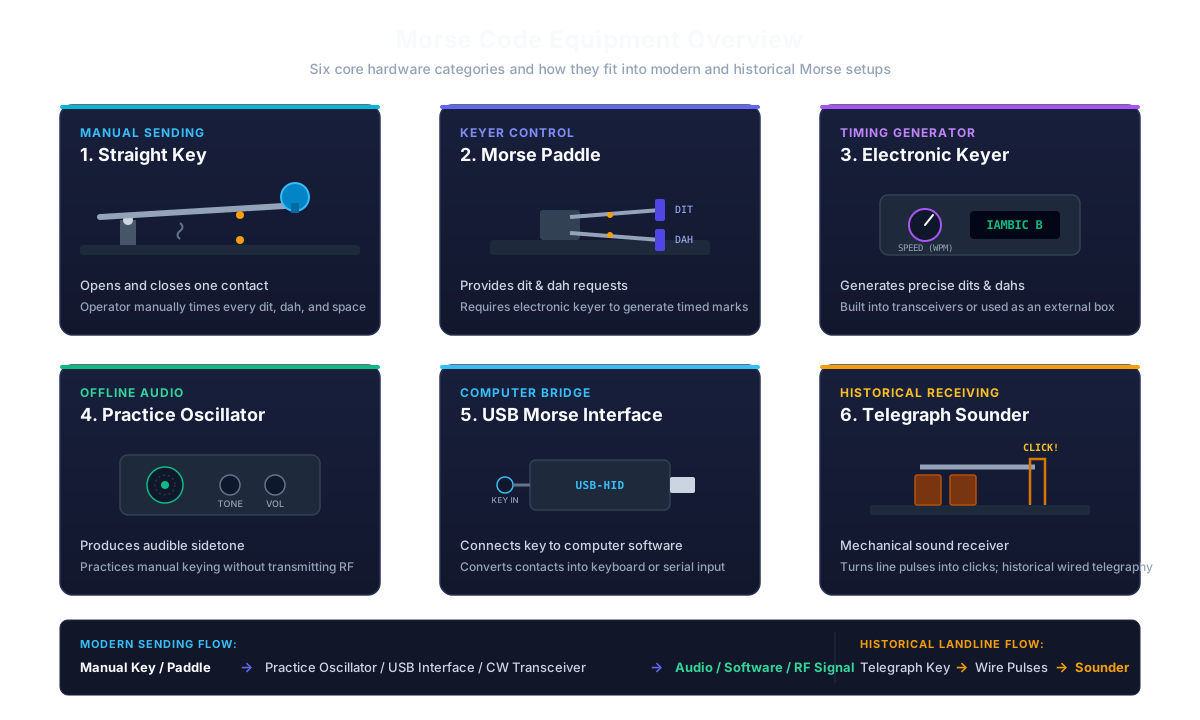
Straight Morse Keys
A straight key is the simplest physical Morse sending control. Mechanically, it behaves like a spring-loaded electrical switch: press the lever and the contact closes; release it and the contact opens. The operator decides how long every mark lasts and how much space to leave between marks and characters.
That manual timing is the defining difference between a straight key and a paddle/keyer system. A straight key does not need an electronic keyer to decide whether a mark should be a dit or dah—the operator creates that distinction by how long the key is held.
What Can a Straight Key Connect To?
The key itself does not need to generate sound. Depending on the goal, its contact can be used by a compatible practice oscillator, a CW-capable radio, or a computer interface that converts the contact state into software input.
Who Is It For?
A straight key makes sense if you want to learn manual sending, explore traditional Morse operation, or add a physical control to a practice setup. It is not mandatory for learning the code itself; listening and character practice can begin entirely in the browser.
Morse Paddles
A paddle looks like a keying device, but its job is different from a straight key. Instead of manually holding the contact for the full duration of every dit or dah, the operator moves the paddle to request a dit or dah from an electronic keyer.
The electronic keyer—not the paddle—creates the precisely timed Morse elements. This distinction matters when assembling a practice or radio setup: plugging a passive paddle into equipment designed only for a basic straight-key contact does not automatically give you electronic paddle keying.
Single-Lever Paddle
A single-lever paddle moves to either side and provides separate dit and dah requests, but only one direction can be engaged at a time. It still relies on an electronic keyer to generate the timed Morse elements.
Dual-Lever Paddle
A dual-lever paddle has independent dit and dah levers. An iambic-capable electronic keyer can interpret both contacts together, allowing squeeze-keying techniques as well as normal one-sided operation.
Single- and dual-lever paddles are both legitimate choices. The useful choice depends on the operator's preferred sending technique and the keyer they intend to use.
Straight Key vs. Paddle: What Actually Changes?
The difference is not simply “slow key versus fast key.” The important distinction is who controls the timing.
With a straight key, your hand controls the duration of the electrical mark directly. With a paddle, your hand requests dits and dahs while an electronic keyer generates their timing.
Straight Key
- Timing: Manual
- Contacts: One main keyed contact
- Needs electronic keyer: No
- Typical use: Manual sending, traditional keying and simple practice
Paddle
- Timing: Generated by electronic keyer
- Contacts: Separate dit/dah control
- Needs electronic keyer: Yes, either external or built into another device
- Typical use: Electronic CW keying

Electronic Keyers
An electronic keyer sits between paddle movement and the final keyed Morse signal. When the operator requests a dit or dah, the keyer generates an element with the correct duration for the selected sending speed. Holding a paddle can also produce repeated elements.
A keyer may be a separate device, built into a practice unit, or built into a CW-capable transceiver. That is why a modern radio operator may own a paddle without owning a separate box labeled “keyer”—the required electronics can already be inside the radio.
Do Straight Keys Need a Keyer?
No. A normal straight key directly opens and closes the keyed circuit, and the operator creates the mark lengths manually. A keyer is specifically useful when electronics need to generate timed elements from paddle input.
What Does “Iambic” Mean?
With a compatible dual-lever paddle and iambic keyer, both paddle contacts can be operated together. The keyer can then alternate dits and dahs according to its operating mode. That behavior comes from the paddle-and-keyer combination, not from the paddle alone.
Morse Code Practice Oscillators
A practice oscillator gives you audible feedback while sending Morse without transmitting a radio signal. A simple setup uses a straight key to control an audio tone: press the key and you hear the sidetone; release it and the tone stops.
This is useful for manual sending practice because you can hear the rhythm and spacing produced by your hand without needing a transceiver.
Does a Practice Oscillator Work with a Paddle?
Only if the device also provides suitable electronic keyer functionality. A basic oscillator designed for one straight-key contact does not know how to turn separate paddle inputs into timed dits and dahs.
Do You Need One?
Not necessarily. A browser key simulator can provide similar audible timing feedback during early practice. A physical oscillator becomes useful when you specifically want to practice with a real key away from a radio or computer.
USB Morse Interfaces
A mechanical Morse key produces contact changes, but a web browser or desktop application needs those changes to arrive through an input method it understands. A USB Morse interface bridges that gap.
Different interfaces expose physical keying in different ways. Some behave like keyboard or mouse input, while others may use MIDI, serial data or a software-specific protocol. Compatibility therefore depends on both the interface and the application.
Straight Key + Computer
A straight-key interface usually needs to report one contact state: pressed or released. Practice software can then measure the timing and classify the marks.
Paddle + Computer
A paddle requires separate dit and dah information, or an interface with its own electronic keyer. If the software expects only one straight-key input, simply connecting a dual-contact paddle does not provide full electronic keying behavior.
Do You Need a USB Interface?
Only if you want to use physical hardware with computer practice. If you are comfortable practicing with a Spacebar, mouse or touchscreen, the browser already provides a no-hardware starting point.
CW-Capable Radios and Key Connections
For on-air Morse operation, a CW-capable transceiver provides the radio transmitter and receiver. A straight key or paddle is only the operator's control input; it is not the radio itself.
With a straight key, the operator normally controls the keyed timing manually. With a paddle, a compatible electronic keyer—often built into the transceiver—generates the dits and dahs.
Check the Radio Manual
Key and paddle inputs are not something to guess. Follow the transceiver manufacturer's documented connection, keyer and electrical requirements rather than assuming every vintage or homemade telegraph arrangement is compatible with modern electronics.
What Else Does an On-Air Station Need?
A working radio station also needs the normal radio-side equipment appropriate to the transceiver, such as a suitable antenna and power arrangement. Those are general amateur-radio station components rather than Morse-specific equipment, so this guide keeps the focus on the Morse keying side.
Note: Transmitting on amateur-radio frequencies may require a licence or other authorization under local rules.
What Is a Telegraph Sounder?
A telegraph sounder is a receiving device from wired telegraph systems. Incoming electrical pulses energize electromagnets that move a lever or armature, producing mechanical clicks that a trained operator interprets as the message.
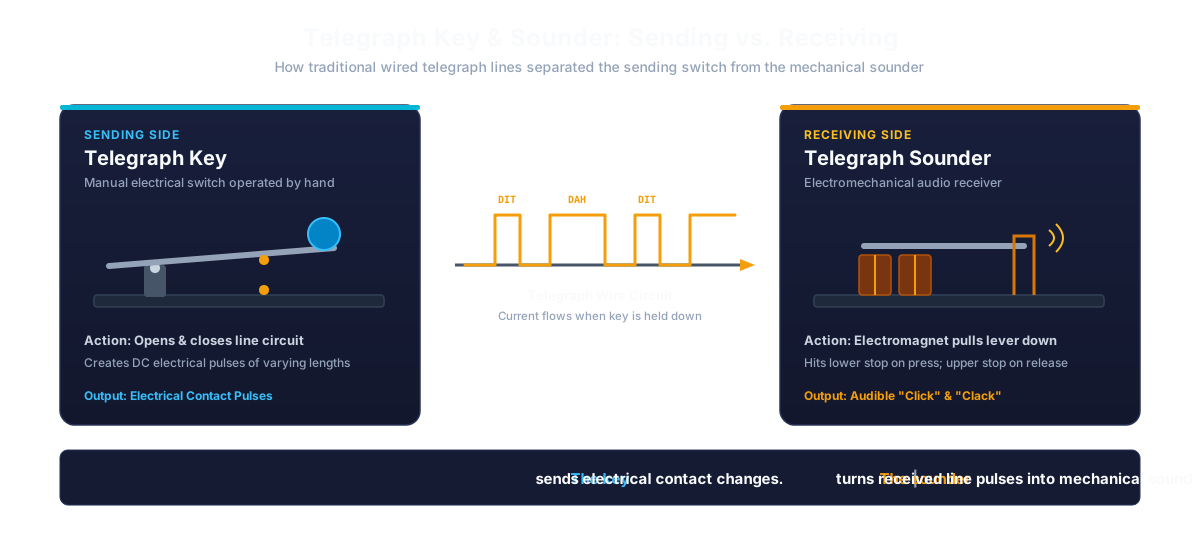
That makes a sounder fundamentally different from a telegraph key. The key is the sending switch; the sounder is on the receiving side.
Is a Telegraph Sounder the Same as a CW Tone?
No. Traditional sounders communicate through mechanical click-and-release timing. Modern amateur-radio CW is normally heard as an audio tone produced from a received radio signal or sidetone system.
American Morse and Historical Telegraphy
Historical U.S. landline telegraphy commonly used American Morse, whose characters and spacing rules differ from modern International Morse. If you are exploring vintage keys and sounders, that distinction matters.
CW Decoders and Readers
A CW decoder or reader attempts to convert received Morse into text. It may be implemented in hardware, radio firmware or software.
Decoders are useful as reference tools, but their performance depends heavily on signal quality and timing. Noise, fading, multiple signals and uneven hand-sent Morse can make automatic decoding less reliable.
For learning, treat a decoder as an aid rather than a replacement for listening practice. Building direct sound recognition is more useful than depending on a display for every character.
What Morse Code Equipment Does a Beginner Actually Need?
If your goal is simply to learn Morse code, the answer can be: none. A browser can generate accurately timed Morse, test character recognition and simulate a manual key before you buy hardware.
If You Want Physical Sending Practice
The simplest physical setup is a straight key with a practice oscillator. It lets you hear your own manual timing without needing a radio.
If You Want to Practice on a Computer
Start with the browser's keyboard, mouse or touchscreen. If you later want the feel of a mechanical key, add a straight key and a compatible USB interface.
If You Want Paddle Sending
Choose a paddle only when you also have access to an electronic keyer, whether that keyer is external, part of a training device or built into a CW transceiver.
If You Want On-Air CW
The Morse-specific side of the setup is the key or paddle/keyer combination. The transceiver, antenna and normal station equipment provide the radio side.
Equipment Progression Summary
Practice Morse Without Buying Equipment
Physical equipment is useful when you want the feel of a real sending control, but it is not a prerequisite for learning the code. A browser can reproduce the timing model needed for early straight-key practice and generate clean Morse audio for listening work.
Use the Morse Code Keyboard when you want to practice pressing and holding a virtual key. Use the Morse Code Trainer when the goal changes from sending to recognizing characters by sound.
Morse Code Keyboard
Practice straight-key timing with your Spacebar, mouse or touchscreen.
Morse Code Trainer
Practice recognizing International Morse characters by sound.
Morse Code Alphabet
Check any letter or number while learning the standard International Morse mappings.
Common Morse Equipment Setups
There is no single standard setup for every learner. These examples show how the pieces connect for different goals.
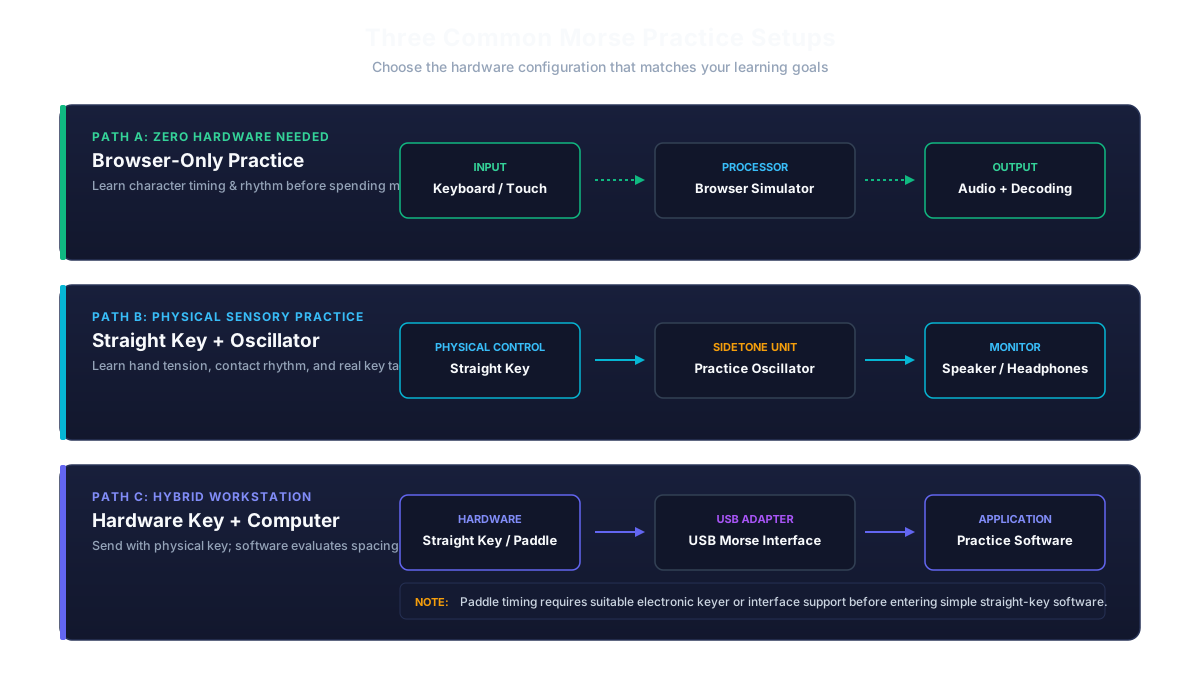
Setup 1: Browser-Only Practice
Keyboard / Mouse / Touch → Browser Morse Tool → Audio + Decoded Feedback
This is enough for learning characters, understanding timing and trying manual keying before purchasing hardware.
Setup 2: Straight-Key Practice Without a Radio
Straight Key → Practice Oscillator → Speaker / Headphones
The key controls the mark and the oscillator provides audible feedback. No RF transmission is involved.
Setup 3: Physical Key with Computer Feedback
Straight Key → Compatible USB Interface → Computer Practice Software
The interface turns the mechanical contact changes into a form the software can read.
Setup 4: Paddle Practice
Paddle → Electronic Keyer → Sidetone / Practice Device
The paddle requests dits and dahs. The keyer generates their timing.
Setup 5: Modern On-Air CW
Straight-key option: Straight Key → CW-Capable Transceiver → Radio Signal
Paddle option: Paddle → Built-In or External Electronic Keyer → CW-Capable Transceiver → Radio Signal
The exact connections and settings depend on the radio, so follow the equipment manual rather than treating these diagrams as wiring instructions.
Frequently Asked Questions
What equipment do I need to learn Morse code?▼
You do not need physical equipment to begin. A browser-based trainer and key simulator can teach character recognition, Morse timing and basic sending practice. If you later want physical sending practice, a straight key is the simplest place to start.
Should a beginner buy a straight key or a paddle?▼
A straight key is the simpler choice if you want to learn manual sending because you control the mark lengths yourself. A paddle is intended to work with an electronic keyer, which generates timed dits and dahs. Neither device is required just to learn the Morse alphabet or practice listening.
Does a Morse paddle create dots and dashes by itself?▼
Not normally. A paddle provides dit and dah control contacts. An electronic keyer—built into a radio, training device or separate unit—uses those contacts to generate correctly timed Morse elements.
What is a Morse code practice oscillator?▼
A practice oscillator generates an audible tone in response to keying so you can hear your own sending without transmitting a radio signal. A simple oscillator can be paired with a straight key for offline manual practice.
Can I connect a real Morse key to a computer?▼
Yes, if you use a compatible interface. USB Morse interfaces can convert the electrical contact changes from a physical key or paddle into input that computer software can understand. Compatibility depends on the interface protocol and the application.
Do I need a radio to practice Morse code?▼
No. You can learn characters, practice listening and simulate manual keying entirely in a browser. A radio becomes necessary only when your goal is actual on-air radio operation.
What is the difference between a telegraph key and a telegraph sounder?▼
The key is the sending control: it opens and closes an electrical circuit to create signal pulses. The sounder is a receiving device: electromagnets move an armature to turn incoming pulses into audible mechanical clicks.
Is a CW decoder the same thing as learning Morse code?▼
No. A decoder attempts to convert received Morse into text automatically. It can be useful as an aid, but signal noise and uneven timing can reduce accuracy. Learning to recognize Morse by sound develops a skill that does not depend on a decoder display.
Do I need a separate electronic keyer for a paddle?▼
You need keyer functionality, but not necessarily a separate box. Many CW-capable transceivers and some training devices already include an electronic keyer. If your device does not, an external keyer can provide that function.
Is historical telegraph equipment the same as modern amateur-radio CW equipment?▼
Not exactly. Both use keyed signaling principles, but traditional wired telegraph systems used equipment such as mechanical sounders and historically could use American Morse. Modern amateur-radio CW normally uses International Morse with radio transmitters, receivers, sidetones and electronic keying systems.
Related Morse Code Tools & Guides
Morse Code Keyboard
Try manual key timing in your browser before adding physical hardware.
Morse Code Trainer
Practice recognizing Morse characters directly from sound.
Morse Code for Beginners
Follow a practical learning path from individual characters toward listening practice.
How Does Morse Code Work?
Learn how dots, dashes and timing gaps form International Morse signals.
International vs. American Morse Code
Understand why historical U.S. telegraph Morse differs from modern International Morse.
Morse Code Translator
Convert typed text to Morse or decode existing dots and dashes.
Morse Code Flashcards
Memorize individual characters before moving into physical sending practice.